Friday, February 5, 2021

‘MultiBrush’ is a Multiplayer Version of ‘Tilt Brush’ for Oculus Quest

It’s been about a week since Google announced it had stopped active development on VR creation suite Tilt Brush (2016) and made the app open source. Now that it’s in the hands of the developer community, we’ve seen Tilt Brush clones aplenty, however SideQuest app MultiBrush gives it something we always hoped it would have: multiplayer mode on Quest.

MultiBrush, created by Rendever, is now available on SideQuest for free.

To get MultiBrush, you’ll need to set up SideQuest, the headset’s unofficial app store. Check out our simple guide of how (and why) to use SideQuest to download this and a mountain of other games and apps.

Rendever says they have plan to publish through Facebook’s App Lab for Quest, which would effectively allow all Quest users to download the app without needing SideQuest.

“This is a first release, some things may not work perfectly and we are still implementing some tools in the multiplayer rooms,” Rendever says. “In individual canvases, the full set of tools is available to you. Stay tuned for more!”

Check out the promo video below:

The post ‘MultiBrush’ is a Multiplayer Version of ‘Tilt Brush’ for Oculus Quest appeared first on Road to VR.


Ream more: https://www.roadtovr.com/multi-brush-multiplayer-tilt-brush-oculus-quest-2/

Oculus Quest v25 Update Brings Messenger, Guardian Improvements, Bluetooth Mice & More

The latest update to Oculus Quest and Quest 2 began rolling out this week with a range of improvements, including the addition of Facebook Messenger, an improved stationary Guardian boundary, support for bluetooth mice, interface improvements, and a navigation tutorial to help new users learn the headset’s various menus.

With a gradual rollout starting this week, the Quest v25 software update is bringing a range of enhancements to the headset. Facebook rolls out updates to users slowly, so not everyone will see the update right away, but you can check for an update manually to see if it’s available to you. Here’s how:

How to Update Quest and Quest 2
  1. In your headset, bring up the Quest menu by pressing the Oculus button on your right controller. Find the Settings section (gear icon).
  2. On the left of the Settings section select ‘About’ at the bottom of the list
  3. Look next to the ‘Software Update’ label to see if a new version is available
  4. Check the ‘Version’ label to see which version is currently installed

One of the biggest additions to v25 is the inclusion of Facebook Messenger on the headset, which will allow users to chat with friends who are using Messenger on their phones, computers, or anywhere else. You’ll even be able to send game and party invitations through Messenger to have friends join you in VR.

A small but welcomed change in v25 is support for bluetooth mice. It was possible previously to connect bluetooth keyboards to make text entry easier (especially in the browser), but now Oculus says you can use the same Bluetooth Pairing menu (under Experimental Features) to pair a mouse as well to be more productive in the Oculus Browser.

Guardian, the playspace boundary for Quest, is also getting an update. Specifically, the stationary boundary has been improved by removing the previous grid visualization for a less intrusive one. Oculus also says the update “adjusts Stationary Guardian to be responsive when you move your headset, no controllers needed.” It’s not entirely clear what this means, though our guess is that the headset is smarter about placing the stationary boundary around you if you’ve moved between sessions. A new tutorial has also been added to explain how to use the Guardian system.

With v25, the Passthrough Shortcut function has been upgraded from an experimental feature to a default feature. Passthrough Shortcut allows users to double-tap the side of their headset to quickly turn on the passthrough view, and double-tap again to turn it off. That’s smart because it can be activated with or without your controllers. It isn’t clear yet if this feature will be enabled by default or users will still need to turn it on as they did previously in the Settings menu.

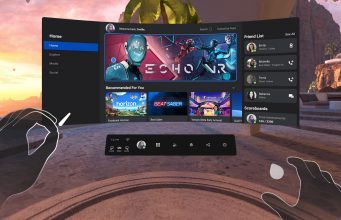
Quest’s v25 update also brings a handful of interface improvements. First, Oculus says that the look, feel, and functionality of VR profiles is cleaner, including having profiles show up directly in the menu bar so that you can look up friends and see their avatars without leaving your current app. Additionally, the Universal Menu has been redesigned with “easier to select menu items,” and an experimental option can be enabled to allow the Universal Menu to be opened inside any app. Accompanying the interface updates, Oculus has added a tutorial to walk new users through the headset’s menus and panels.

With this update you can also trim captured videos so that you can share just a portion rather than the entire thing. This can be done through the camera roll in the share section.

The Oculus PC software also gets some improvements to Oculus Link with the v25 release. Quest 2 users using USB-2 cables can now increase their refresh rate to 80Hz or 90Hz (this was already available to those using USB-3 cables). The update also fixes a handful of ‘black screen’ bugs which could cause Oculus Link not to work correctly.

Check out the full Oculus Quest v25 patch notes below:

Messenger

  • We’re starting to roll out Messenger on Oculus to people who have logged into Quest and Quest 2 using their Facebook account.
  • With this update, you can choose to chat with your Facebook friends anywhere they have Messenger, even if they’re not in VR. You can:
    • Chat with friends anywhere they have Messenger, without taking off the headset.
    • Invite friends to join you in a game or experience.
    • Jump into games together by sending a party invite.
  • Please note this will continue to roll out in the coming weeks, so you may not see the update right away — stay tuned as it continues to be released.

Guardian and Passthrough

  • Stationary Guardian 2.0
    • We’ve improved Stationary Guardian with the following updates:
      • Updated Stationary Guardian visuals to remove the grid.
      • Adjusted Stationary Guardian to be responsive when you move your headset, no controllers needed.
      • Added a new in-VR tutorial explaining how to use Guardian.
  • Passthrough Shortcut
    • We’re moving our Passthrough Shortcut from the experiments panel to general availability. This feature allows you to activate your Passthrough view by double-tapping the side of your Quest or Quest 2 headset. Double-tap again to switch back to your view in-VR.

VR Profiles

  • We’ve updated the look, feel, and functionality of in-VR profiles and info. Some of the specific changes you’ll see include:
    • Having profile cards show up directly from your menu bar, so you can look up your friend or check out their new avatar without leaving your current app or experience.
    • We’ve made it so that people who use Facebook to log into Oculus can display Facebook friends and more easily communicate.
      • Keep in mind, you can change or update your privacy settings at any time.

Universal Menu

  • You can now access the Universal Menu across any apps, games or experiences you’re currently in.
    • To enable this feature, put on your headset and select Settings > Experimental Features > Universal Menu Overlay.
  • We’ve also made updates and improvements to the the design and function of the Universal Menu. These include:
    • A sleeker toolbar design with easier to select menu items.
    • When you’re in a Party, you can now view Party details and leave the Party directly from the Universal Menu.
    • Improved tablet behavior when launching apps, switching panels, or resuming headset use.

Menu Navigation Tutorial

  • We’ve added a new tutorial to walk you through how to navigate the various menus and panels from your Quest home environment. The in-VR lesson plan includes:
    • How to use the Universal Menu.
    • How to navigate between the different menu options and panels.
    • Understanding how the different panels and menu bar work together.

Oculus Browser

  • You can now resize windows horizontally when using Oculus Browser. To do this:
    • Open Browser and hover over the left or right edge of any window. Use either your grip or trigger buttons to grab the handle and resize the window.
    • You can open up to three Browser windows at a time and adjust each panel separately.

Bluetooth Mouse

  • You can now use a Bluetooth mouse while you’re in-VR. To do this:
    • Ensure that your Bluetooth mouse in is pairing mode, then go to Settings > Experimental Features > Bluetooth Pairing
    • Once you select your mouse from the pairing menu, you’ll be able to use it in VR.

Camera roll

  • You can now trim the length of your captured videos to share out exactly the right moments by entering the edit mode after opening a captured video.
    • To do this: select your captured video from your camera roll, select the pencil icon in the top right portion of window, and drag your clip to the desired length.
      • Keep in mind, you can only trim a video if it’s more than 30 seconds in length.

Oculus Link

  • You can now set your refresh rate to 80hz and 90hz when using Link with a USB-2 cable.
    • Keep in mind, that even with some of the newest and most powerful GPUs, maxing out values for the render resolution slider with a 90 Hz refresh rate may result in dropped or missing frames.
  • Fixed an issue causing Link to show a black screen after exit.
  • Reduced incidence of “Oculus Link is not working” errors that were happening on shut down.
  • Fixed numerous black screen issues that could prevent you from being able to use Oculus Link.
  • Fixed an issue where the new graphics settings in the Oculus desktop app weren’t showing for some people.

The post Oculus Quest v25 Update Brings Messenger, Guardian Improvements, Bluetooth Mice & More appeared first on Road to VR.


Ream more: https://www.roadtovr.com/oculus-quest-2-v25-update-messenger-guardian-bluetooth-mouse/

Wednesday, February 3, 2021

Quest 2 Leaps to 2nd Most Used on Steam as Headsets Hit Record High of 2.6 Million

Although Quest 2 is a standalone headset, it can also be plugged into a PC to play PC VR games through Oculus PC and Steam. The headset’s holiday success has clearly bled through into the PC VR landscape, as the latest data shows that Quest 2 is now the second most used headset on Steam, with the total number of monthly-connected headsets on the platform reaching a new all-time high of 2.6 million.

Monthly-connected VR Headsets on Steam

Each month Valve collects info from Steam users to determine some baseline statistics about what kind of hardware and software is used by the platform’s population, and to see how things are changing over time, including the use of VR headsets.

The data shared in the survey represents the number of headsets connected to Steam over a given month, so we call the resulting figure ‘monthly-connected headsets’ for clarity; it’s the closest official figure there is to ‘monthly active VR users’ on Steam, with the caveat that it only tells us how many VR headsets were connected, not how many were actually used.

While Valve’s data is a useful way see which headsets are most popular on Steam, the trend of monthly-connected headsets has always been obfuscated because the data is given exclusively as percentages relative to Steam’s population—which itself is an unstated and constantly fluctuating figure.

To demystify the data Road to VR maintains a model, based on the historical survey data along with official data points directly from Valve and Steam, which aims to correct for Steam’s changing population to estimate the actual count—not the percent—of headsets being used on Steam.
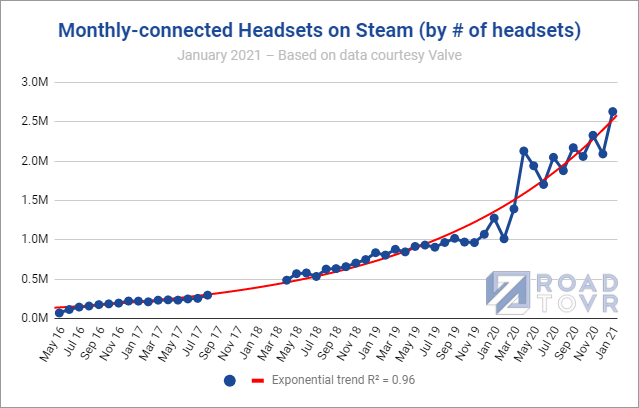
Thanks to the holiday surge, monthly-connected headsets on Steam have reached a new all-time high of 2.6 million. This appears to have been partly driven by the holiday success of Quest 2 and the portion of users that are using it as a PC VR headset. This tracks with Facebook’s recent touting of Quest 2 as “one of the hot holiday gifts this year.”

Share of VR Headsets on Steam

Looking past the overall number of monthly-connected headsets on Steam, we see further that Quest 2 has become a major player on the platform, having leapt into the #2 position among the most common headsets on Steam at 17.4%, behind only Rift S at 23.4% (+0.83%).
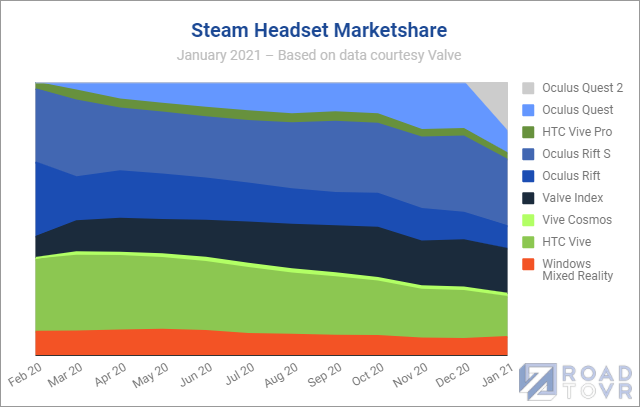
The jump is meaningful, but not quite as sudden as it might seem. This is the first month that Valve has split Quest 2 into its own category in the data; in the prior months following the launch of Quest 2, it appears that both Quest and Quest 2 were lumped into the same category.

With Quest 2 now getting a dedicated category it looks like Quest lost a lot of share in the last month, but in reality this is due to the reclassification of Quest 2 into its own category. Both headsets likely gained share since the previous month, though Quest 2 clearly saw the bulk of the growth. If lumped together as they were previously, Quest + Quest 2 would have ranked as the most used headset on Steam with a 25% share.

Another interesting bit from the latest data is some growth in Windows Mixed Reality, which gained +0.93% to reach 6.38% of headsets on Steam. That’s a small but notable increase for the category which has been slowly but steadily shrinking for more than a year. The growth is likely driven by the recent launch of HP Reverb G2, the first WMR headset to be released in some time.

Looking above at the graph also reveals another telling trend: the areas of the chart becoming more compressed over time show less dominance by any one headset, meaning that there’s increasingly meaningful choice in headsets among customers.
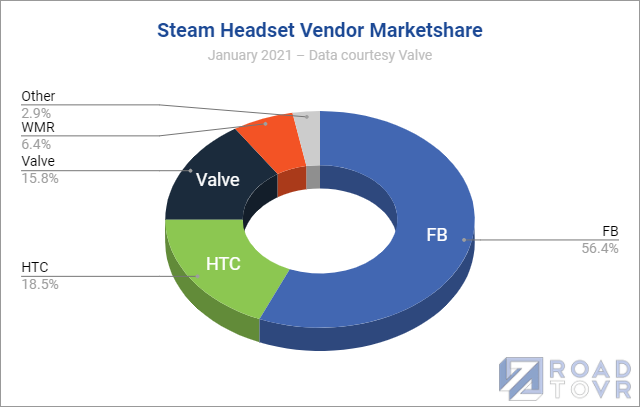
From a vendor standpoint, however, Facebook is becoming increasingly dominant, with Oculus headsets now holding a combined 56.4% of the share of headsets on Steam.

The post Quest 2 Leaps to 2nd Most Used on Steam as Headsets Hit Record High of 2.6 Million appeared first on Road to VR.


Ream more: https://www.roadtovr.com/steam-survey-quest-2-most-used-headsets-steamvr-record-high/

Vertigo Games Acquires VR Arcade Game Distribution Platform SpringboardVR

Vertigo Games, the studio behind Arizona Sunshine (2017) and upcoming VR shooter After the Fall, today announced that it has acquired SpringboardVR, creators of the eponymous location-based VR content distribution platform.

The acquisition amount was undisclosed, however the move is slated to see several members of the SpringboardVR team transfer to Vertigo Games, something the company says in a press statement will “ensure seamless service and operations for arcade operators and game studios around the world.”

Vertigo Games says both the SpringboardVR brand and software platform will continue to operate “but with the support and resources of the Vertigo Games team.”

“This combination will provide operators with access to free-roam VR content via Vertigo’s HAZE VR distribution platform as well as giving both operators and game studios new tools to grow their LBE business. The roadmap for this new content and features will be released in the near future,” Vertigo Games says.

The founders of SpringboardVR and a few senior members of their development, product, and services teams have moved to form the core of a new company called ArborXR, which manages devices, content, and users in the enterprise VR ecosystem.

Location-based entertainment is still very much an industry in recession, as nearly all VR arcades worldwide shut down for extended periods due to the COVID-19 pandemic. Even now with the initial rollout of a multiple vaccines, the most well-funded names in location-based VR entertainment, The Void and SandboxVR are still dangerously close to complete bankruptcy. With the acquisition of SpringboardVR though, it’s possible companies believe location-based entertainment is about to make a come back.

The post Vertigo Games Acquires VR Arcade Game Distribution Platform SpringboardVR appeared first on Road to VR.


Ream more: https://www.roadtovr.com/vertigo-games-acquires-vr-arcade-game-distribution-platform-springboardvr/

OCULUS QUEST 2 – How To Use App Lab (New Way To “Sideload”)


App Lab for Oculus Quest 2 and 1 allows you to easily install games or apps that are not on the Quest store just by getting a link. This is like a new way to "sideload". There are pros and cons, which I'll explain today. I'll also show how to use App Lab, talk about its features, and we'll talk about SideQuest's role. ► Our VR equipment kit & tips here → https://www.amazon.com/shop/caschary (affiliate link) ► Subscribe here → https://goo.gl/bSJ6L8 We are covering an exciting new feature on Oculus Quest called App Lab. This is a new way for developers to distribute apps directly to us, the consumers, via direct links. ----------------------------------------------------------------------------------- LINKS ► How To Sideload On SideQuest → https://youtu.be/CQ6TcLwSGag APP LAB GAMES - Free Ancient Dungeon Beta by ErThu https://www.oculus.com/experiences/quest/4897577166950223/ Descent Alps - Demo by Sutur https://www.oculus.com/experiences/quest/4220127154668056/ Gym Class by IRL Studios Inc https://www.oculus.com/experiences/quest/3661420607275144/ Puzzling Places - Beta by realities.io Inc https://www.oculus.com/experiences/quest/3623167214470921/ Spark AR Player by Facebook https://www.oculus.com/experiences/quest/3221459317889390/ Smash Drums Demo by PotamWorks https://www.oculus.com/experiences/quest/3508439205941147/ Zoe by apelab oculus.com/experiences/quest/3942334819110532/ - Paid Baby Hands by Chicken Waffle https://www.oculus.com/experiences/quest/2442843265745901/ Crisis VRigade by Sumalab https://www.oculus.com/experiences/quest/3926597184026195/ Crisis VRigade 2 by Sumalab https://www.oculus.com/experiences/quest/5167901379894551/ Deisim by Myron Software https://www.oculus.com/experiences/quest/3526702020710931/ MarineVerse Cup by MarineVerse https://www.oculus.com/experiences/quest/2465388190184288/ ► Get an Oculus Quest 2 (US) → http://bit.ly/quest2-casvr ► Get an Oculus Quest 2 (NL - Coolblue) → https://cb.prf.hn/l/784dkp8 ► Get on Amazon → https://amzn.to/2RSxaDi May contain affiliate links that earn us a small referral fee from qualifying purchases at no extra cost to you. ----------------------------------------------------------------------------------- TIMESTAMPS 00:00 Intro & What Is App Lab 00:59 Quest v25 Update Intro 01:22 App Lab Advantages & Disadvantages 02:16 SideQuest's Role 03:09 How To Install Games Using App Lab 04:20 Extra Tips & Features Explained 05:04 How To Update To v25 05:44 How To Find App Lab Games & Outro ----------------------------------------------------------------------------------- SUPPORT THE CONTENT (and become our VR Champion) ► Become our Patron → http://bit.ly/PatreonCasandChary ► Become a Sponsor on YouTube → http://bit.ly/JoinCasandChary ► Buy our VR Merch → http://bit.ly/casandchary-merch VR DISCOUNT CODES & AFFILIATE LINKS ► ► https://casandchary.com/discount-codes-affiliate-links/ ----------------------------------------------------------------------------------- OUR GEAR Our VR Equipment & Tips → https://www.amazon.com/shop/caschary (affiliate link) Our PC Specs → https://casandchary.com/vr-equipment/ MUSIC Music we use is from Epidemic Sounds → http://bit.ly/CCEpidemicSound ----------------------------------------------------------------------------------- GET LATEST UPDATES Twitter → https://twitter.com/CasandChary Facebook → https://www.facebook.com/casandchary/ Instagram → https://www.instagram.com/casandchary/ Join our Discord → https://discord.gg/YH52W2k ----------------------------------------------------------------------------------- A SPECIAL THANKS to these Patreon Champs 🛡️ for their support: 😘 BaxornVR, Wintceas, Studioform VR, Barr'd4Life, Andy, Albert, Ben P., Steve Dunlap, Thomas M. Rice, Andy Fidel, VR Balance, Nathan S., Adriaan K. ----------------------------------------------------------------------------------- DISCLAIMER This video was not sponsored. Links in this description may contain affiliate links. We may earn a small referral fee from qualifying purchases that helps supports the channel. However, it doesn't cost you more. #applab #oculusquest2 #casandchary VR on! - Cas and Chary VR

Meditative World-building Game ‘Winds & Leaves’ Coming Exclusively to PSVR This Spring

Trebuchet, the Montreal-based studio behind Prison Boss VR (2017), announced it’s getting ready to release a new exclusive on PSVR soon, this time serving up a non-linear world-building game called Winds & Leaves.

Winds & Leaves is set in a desert planet which tasks you with taking it from barren to blooming. Trebuchet says you’ll be able to roam through various biomes and bring back life to the world “one seed at a time.”

At least from the announcement trailer, it seems to be less about garden management and more about casual discovery, as you find new seeds, biomes, and level up your gear. You plant trees, and it seems you’re given the power to speed up time, so you can see the forests and various contraptions take hold of the world.

Trebuchet co-founder and creative director Alexandre Pernot Lopes reveals that the game’s locomotion scheme is unique. Instead of walking around conventionally, you’re placed atop stilts, which aide you in reaching high places.

“Early in development, we started thinking of ways to make this engaging in VR. We wanted to make a peaceful experience, but not a passive one,” Pernot Lopes says in a PS blogpost. “There comes our unique locomotion system, the Stilts, allowing you to feel each step you take with your PS Move controllers. You can raise or lower them to adapt your pace, or to reach fruits higher in your trees. Stilts can also retract to let you climb at the top of any tree to survey your surroundings.”

Wind & Leaves is due out on PSVR in Spring 2021. The season officially starts on March 20th, so we’re hoping to see a more precise launch date soon.

The post Meditative World-building Game ‘Winds & Leaves’ Coming Exclusively to PSVR This Spring appeared first on Road to VR.


Ream more: https://www.roadtovr.com/meditative-world-building-game-winds-leaves-coming-exclusively-psvr-spring/

Facebook Messenger Comes to Oculus Quest in New Update

Facebook announced that the v25 software update for its Quest platform is set to include Facebook Messenger, which will be available to anyone who is logged into their Facebook account on either Quest or Quest 2.

This will allow users to chat with Facebook friends who own any device with Messenger. The company says in a blogpost that without taking off the headset you’ll be able to write messages by typing with a virtual keyboard, select from pre-written texts, or use Quest’s voice-to-text function.

Additionally, users can also send private Oculus Party invites to make jumping into multiplayer games more simple. Facebook says the v25 update is rolling out starting this week, however may take a few weeks to arrive to all users.

Whether for ill or good, finally having a cross-platform, system-wide messenger on Quest will hopefully make it easier to meet up with friends and maintain contact with the outside world without having to exit VR. Although slightly confusing, this effectively creates two messenger options in-headset: one using your public-facing Facebook account, and the Oculus Chats messenger which is used exclusively with people on your Oculus friends list.

Facebook says that using Messenger on Oculus doesn’t change your existing Oculus privacy settings, and that you can still message your Oculus friends using Oculus Chats with your existing Oculus username.

The post Facebook Messenger Comes to Oculus Quest in New Update appeared first on Road to VR.


Ream more: https://www.roadtovr.com/oculus-quest-2-update-facebook-messenger/

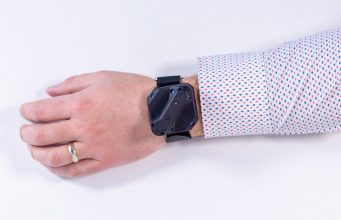
At $600K, Tundra Tracker Smashes Kickstarter Goal in Less Than 24 Hours

Tundra Tracker, the SteamVR Tracking tracker in development by Tundra Labs, has well exceeded its $250,000 Kickstarter goal in less than 2...