Monday, January 11, 2021

CREAL Reveals Its First Light-field AR & VR Headset Prototypes

Switzerland-based CREAL, which is developing a light-field display, has revealed its first prototype AR and VR headsets. The milestone marks ongoing progress in shrinking the once-bulky tech into something which can be worn on the head.

Compared to the displays used in VR and AR headsets today, light-field displays generate an image that accurately represents how we see light from the real world. Specifically, light-field displays support both vergence and accommodation, the two focus mechanisms of the human visual system. Creal and others say the advantage of such displays is more realistic and more comfortable visuals for XR headsets. For more on light-fields, expand our explainer below.

Light-fields are significant to AR and VR because they’re a genuine representation of how light exists in the real world, and how we perceive it. Unfortunately they’re difficult to capture or generate, and arguably even harder to display.

Every AR and VR headset on the market today uses some tricks to try to make our eyes interpret what we’re seeing as if it’s actually there in front of us. Most headsets are using basic stereoscopy and that’s about it—the 3D effect gives a sense of depth to what’s otherwise a scene projected onto a flat plane at a fixed focal length.

Such headsets support vergence (the movement of both eyes to fuse two images into one image with depth), but not accommodation (the dynamic focus of each individual eye). That means that while your eyes are constantly changing their vergence, the accommodation is stuck in one place. Normally these two eye functions work unconsciously in sync, hence the so-called ‘vergence-accommodation conflict’ when they don’t.

On more advanced headsets, ‘varifocal’ approaches dynamically shift the focal length based on where you’re looking (with eye-tracking). Magic Leap, for instance, supports two focal planes and jumps between them as needed. Oculus’ Half Dome prototypes do something similar, with support for a larger number of focal planes. Even so, these varifocal approaches still have some inherent issues that arise because they aren’t actually displaying light-fields.

While Creal has previously demonstrated its impressive light-field display technology, we’ve only ever seen in it large benchtop demos. Now the company has revealed its latest progress in shrinking the tech to fit into a head-mounted form factor. While its AR and VR prototypes are still fairly large, by 2022, the company says it expects its tech to fit into yet smaller form factors.
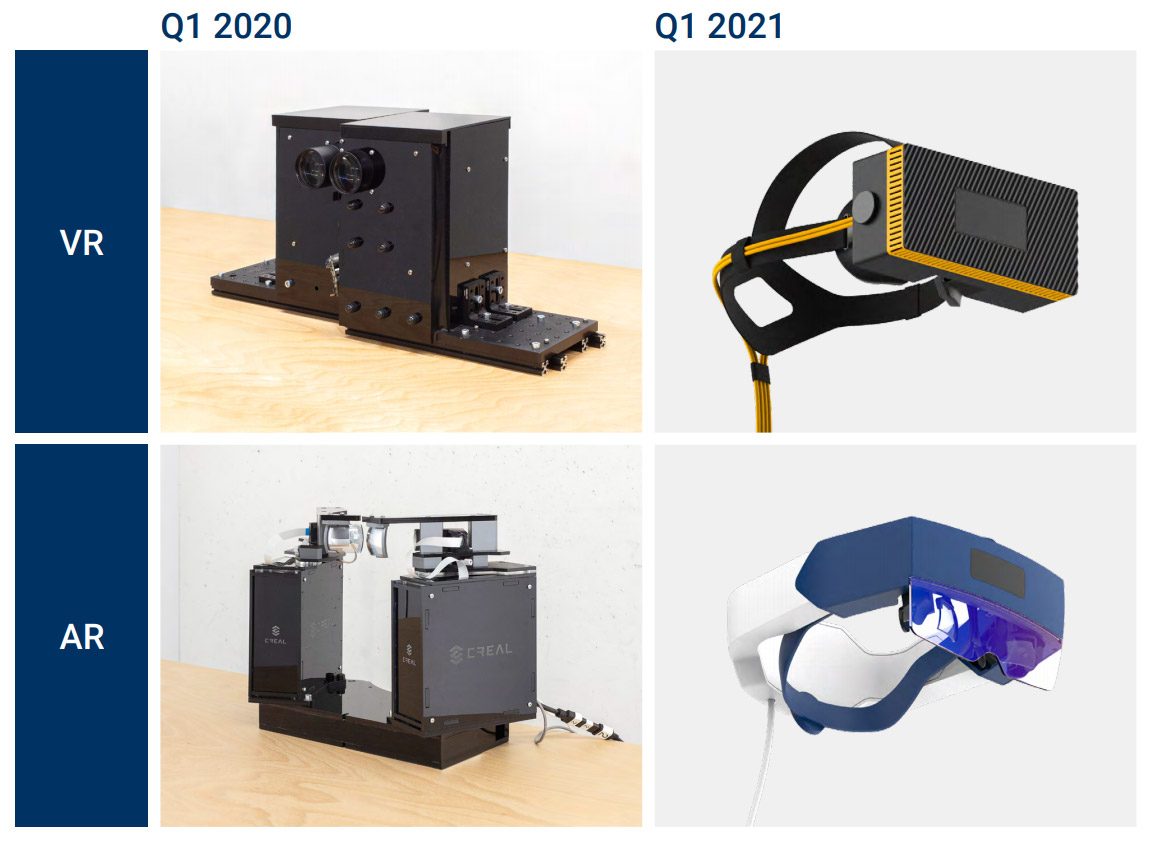
Image courtesy CREAL

Creal says these prototype headsets are ‘evaluation units’ which the company is sending to potential partners to demonstrate its light-field display. The company’s goal is not to build its own headsets, but to supply its light-field display technology to other headset makers.

CREAL AR Light-field Prototype
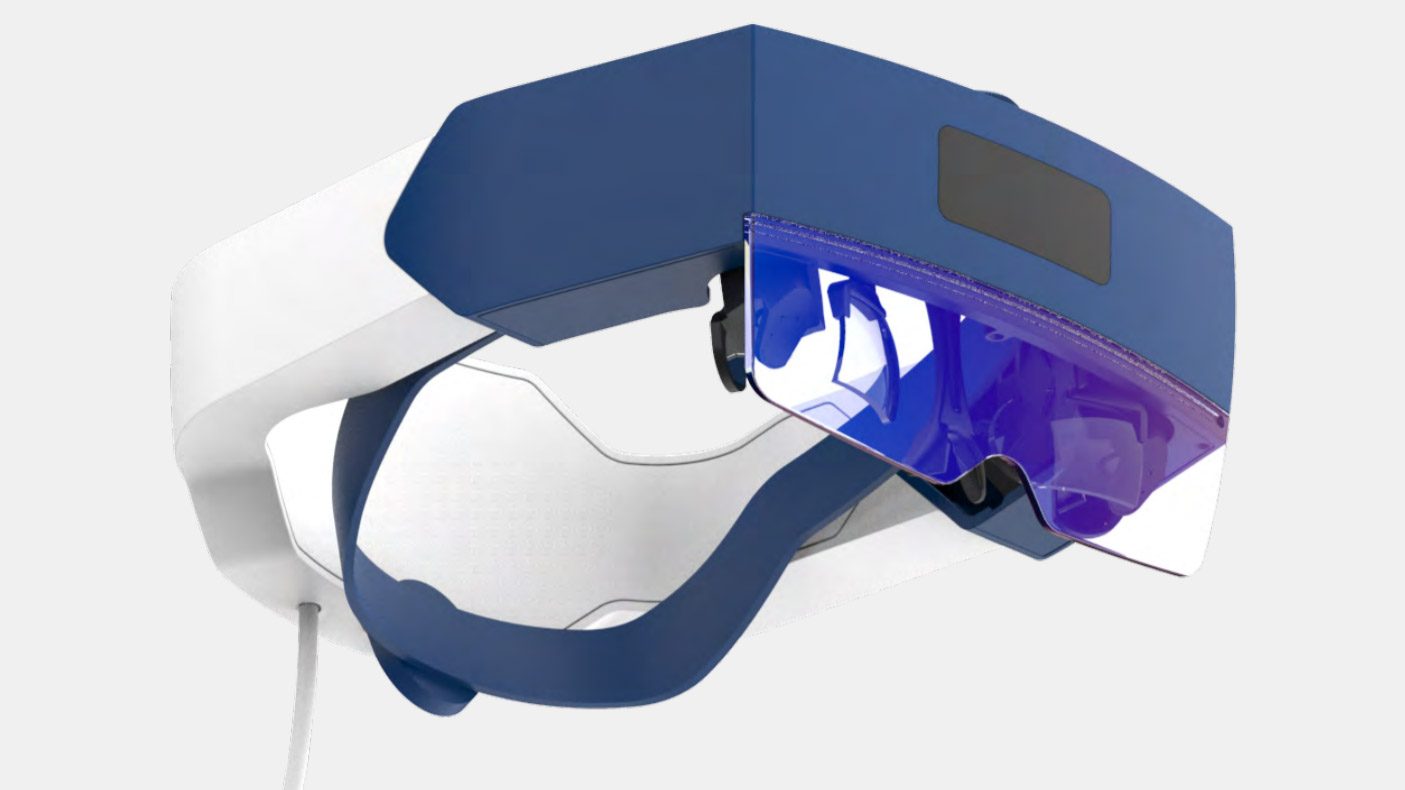
Image courtesy CREAL

The Creal AR headset prototype has a resolution of 1,000 × 1,000 across a 60° field of view, according to the company, which also claims ‘unlimited’ depth-resolution (meaning continuous focal planes), with the caveat that it isn’t truly unlimited but that the steps between each focal depth are “much smaller than an eye can resolve.”

The Creal AR headset prototype is tethered and uses an Intel RealSense sensor for 6DOF tracking and Ultraleap for hand-tracking. Below you can see a through-the-lens demo showing the ability to focus at different depths.

While the Creal AR headset prototype is approaching the size of something like HoloLens, the company claims it will be able to fit its light-field tech into a sleek glasses form-factor by late 2022. Doing so will require moving to a foveated version of its display which would see the central 30° of the field of view occupied by the light-field, while the peripheral view would be filled with non-light field imagery out to 60° total, the company says.

Image courtesy CREAL

Creal is also expecting to reduce power consumption from the current 2W down to 0.5W for the glasses-sized version, while boosting the eye-box to 8mm.

CREAL VR Light-field Prototype
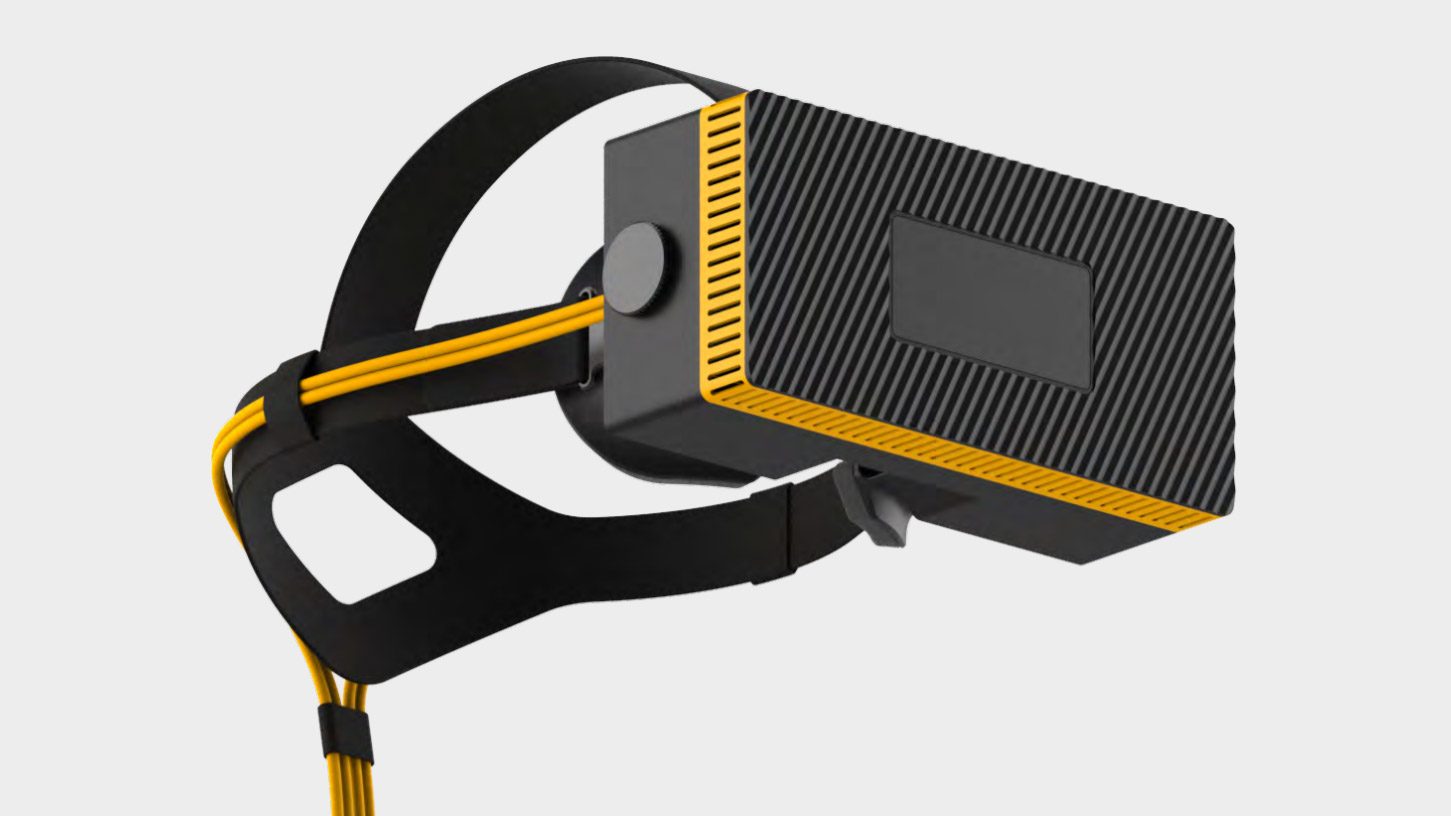
Image courtesy CREAL

With its VR headset, Creal says it’s already employing the foveated light-field approach, with a 1,000 × 1,000 resolution light-field covering the central 30° of the field of view, and a 1,600 × 1,440 non-light-field view to fill out to 100° total. Because the light-field area is only 30° across, the resulting resolution is 40 PPD, which is approaching the retina resolution threshold (roughly 60 PPD). Below you can see a through-the-lens video showing the headset’s ability to focus at any depth in the scene.

The Creal VR headset prototype is using an Intel RealSense sensor for 6DOF tracking and includes eye-tracking from Pupil Labs, though the company notes that eye-tracking isn’t necessary for the light-field functionality.
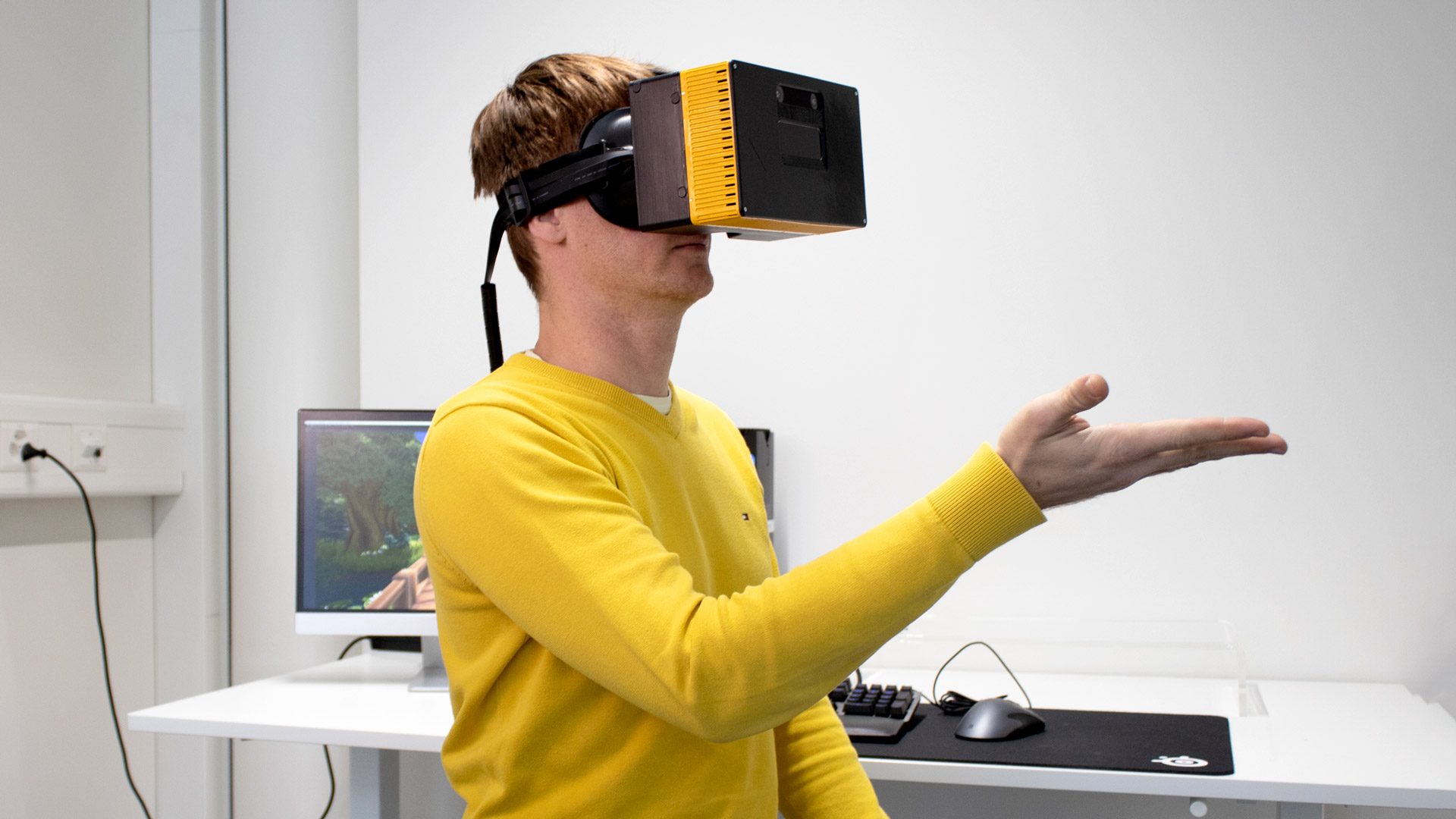
Image courtesy CREAL

As with its AR headset prototype, the bulky VR headset prototype is a step toward a more compact version of the headset which the company expects to have ready by late 2022. By this point the company expects to integrate custom 6DOF and eye-tracking hardware (which would help further reduce the headset’s size).
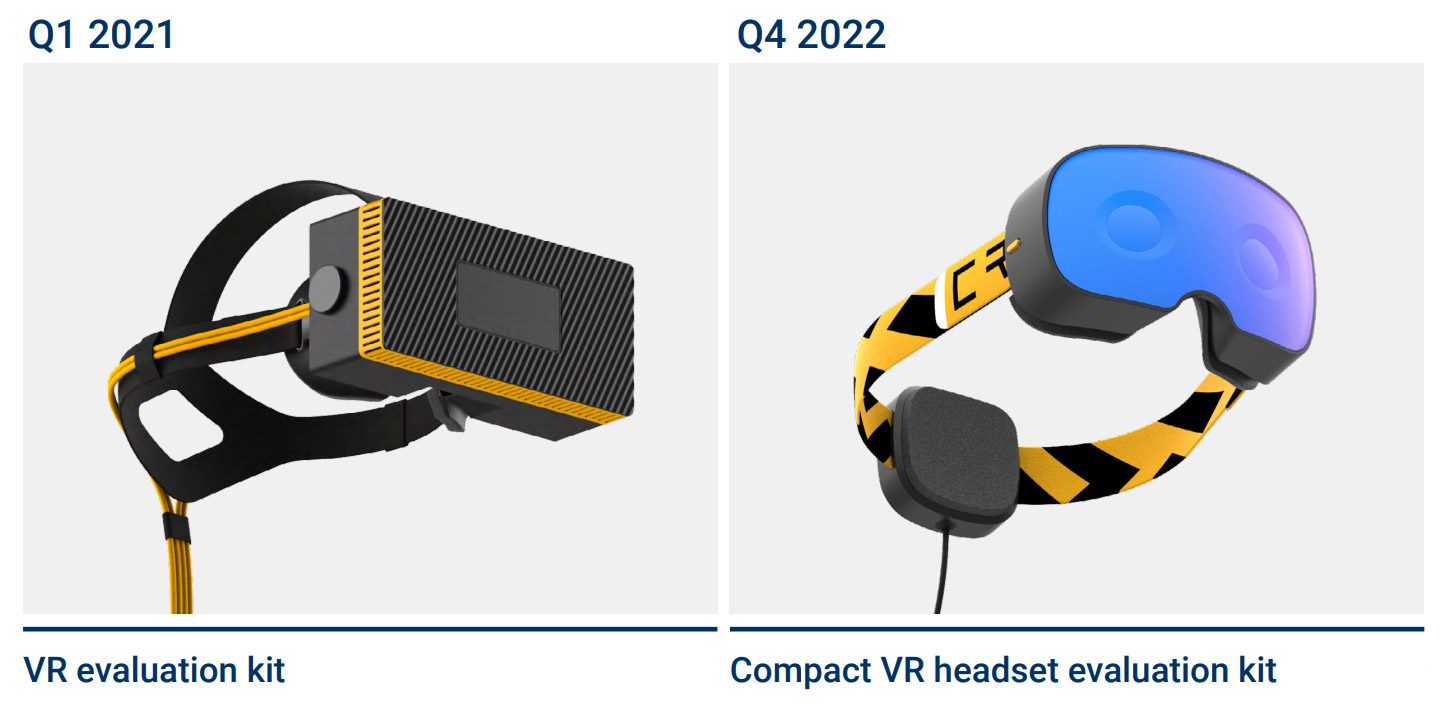
Image courtesy CREAL

– – — – –

With the company planning to use a foveated combination of light-field and non-light-field displays going forward, we’ll be especially interested to see how closely the two views manage to blend together.

Creal’s announcement of head-mounted light-field prototypes follows the company’s latest investment round of $7.2 million announced late last year.

The post CREAL Reveals Its First Light-field AR & VR Headset Prototypes appeared first on Road to VR.


Ream more: https://www.roadtovr.com/creal-light-field-ar-vr-headset-prototype/

Friday, January 8, 2021

How to Tell if Your PC is VR Ready

With a growing number of affordable next-gen PC-compatible headsets like Quest 2 and HP Reverb G2, there’s more reason than ever to finally jump into VR. For the gamers out there who are beginning to consider purchasing a headset, one major question marks the starting point on their journey to a decision: can my PC handle it? Here’s how to find out.

Updated – January 8th, 2021

VR gaming is much more resource intensive than monitor gaming. In short, that’s because the render resolution is much higher than the 1080p displays used by most PC users today. Not to mention, VR games must also be rendered in 3D and anywhere from 72 to 144 FPS depending on the headset.

Many headset makes provide what they call a ‘recommended’ hardware configuration for virtual reality gaming. This gives VR developers a baseline hardware target so that they can ensure the consistent FPS requirement is met. If your hardware does not meet the recommended specification, you risk dropping under framerate which can result in a choppy and potentially uncomfortable VR experience.

The recommended specs provided by each company are relatively similar but there are some key differences worth looking at in detail:

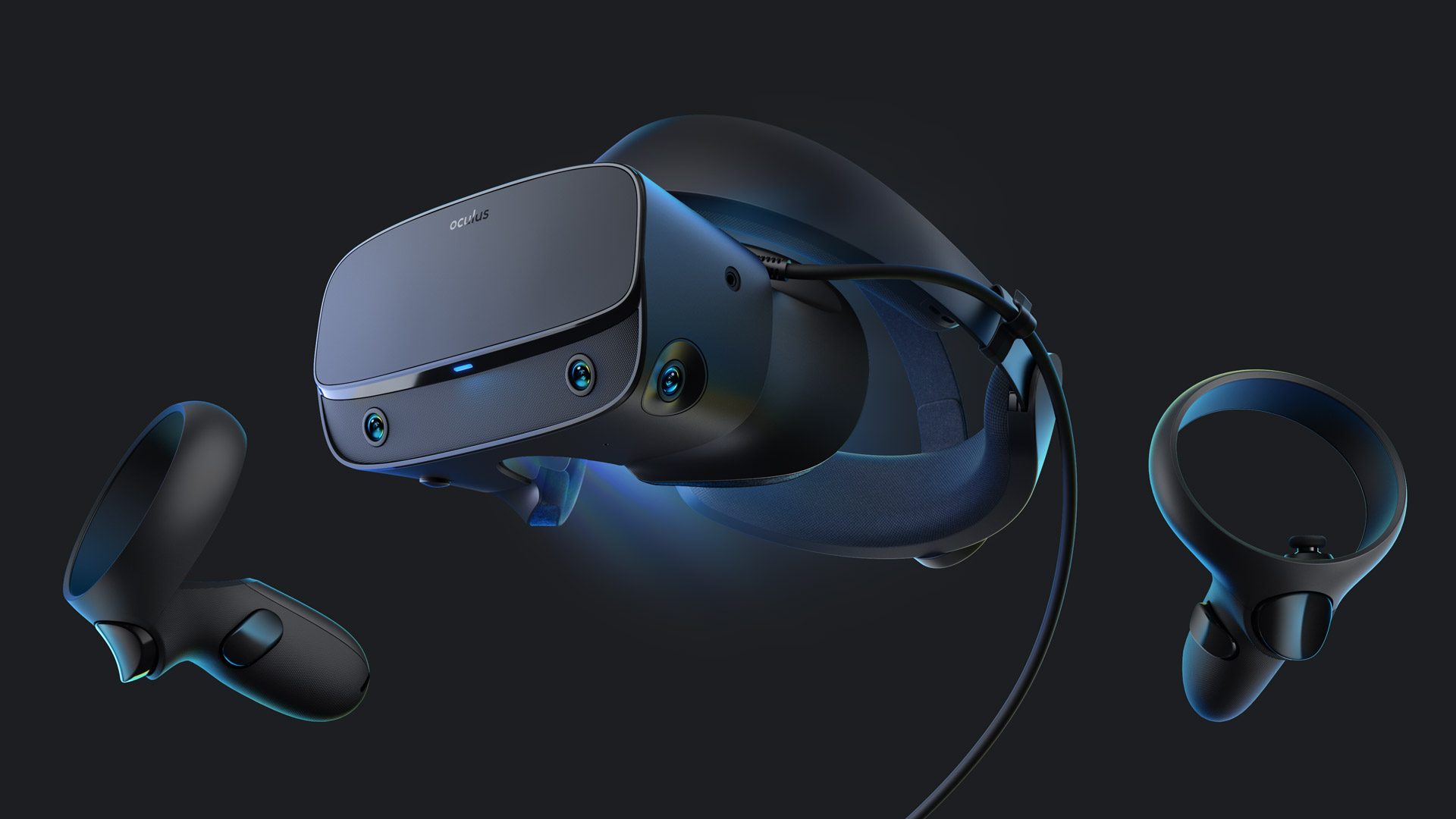
Oculus

Image courtesy Oculus
Oculus Rift S Recommended VR Specifications:
  • Video Card: NVIDIA GTX 1060 / AMD Radeon RX 480 or greater
  • CPU: Intel i5-4590 / AMD Ryzen 5 1500X or greater
  • Memory: 8GB RAM or greater
  • Video Output: DisplayPort
  • USB Ports: 1x USB 3.0 port
  • OS: Windows 10
Oculus Rift CV1 Recommended VR Specifications:
  • Video Card: NVIDIA GTX 1060 / AMD Radeon RX 480 or greater
  • CPU: Intel i5-4590 / AMD Ryzen 5 1500X or greater
  • Memory: 8GB RAM or greater
  • Video Output: Compatible HDMI 1.3 video output
  • USB Ports: 3x USB 3.0 ports plus 1x USB 2.0 port
  • OS: Windows 10 (Windows 7/8.1 no longer recommended)
Oculus Quest & Quest 2 with Oculus Link

Oculus Quest & Quest 2 can also play PC VR games via Oculus Link. See this article for the most up to date info on Oculus Quest recommended specs and supported graphics cards.

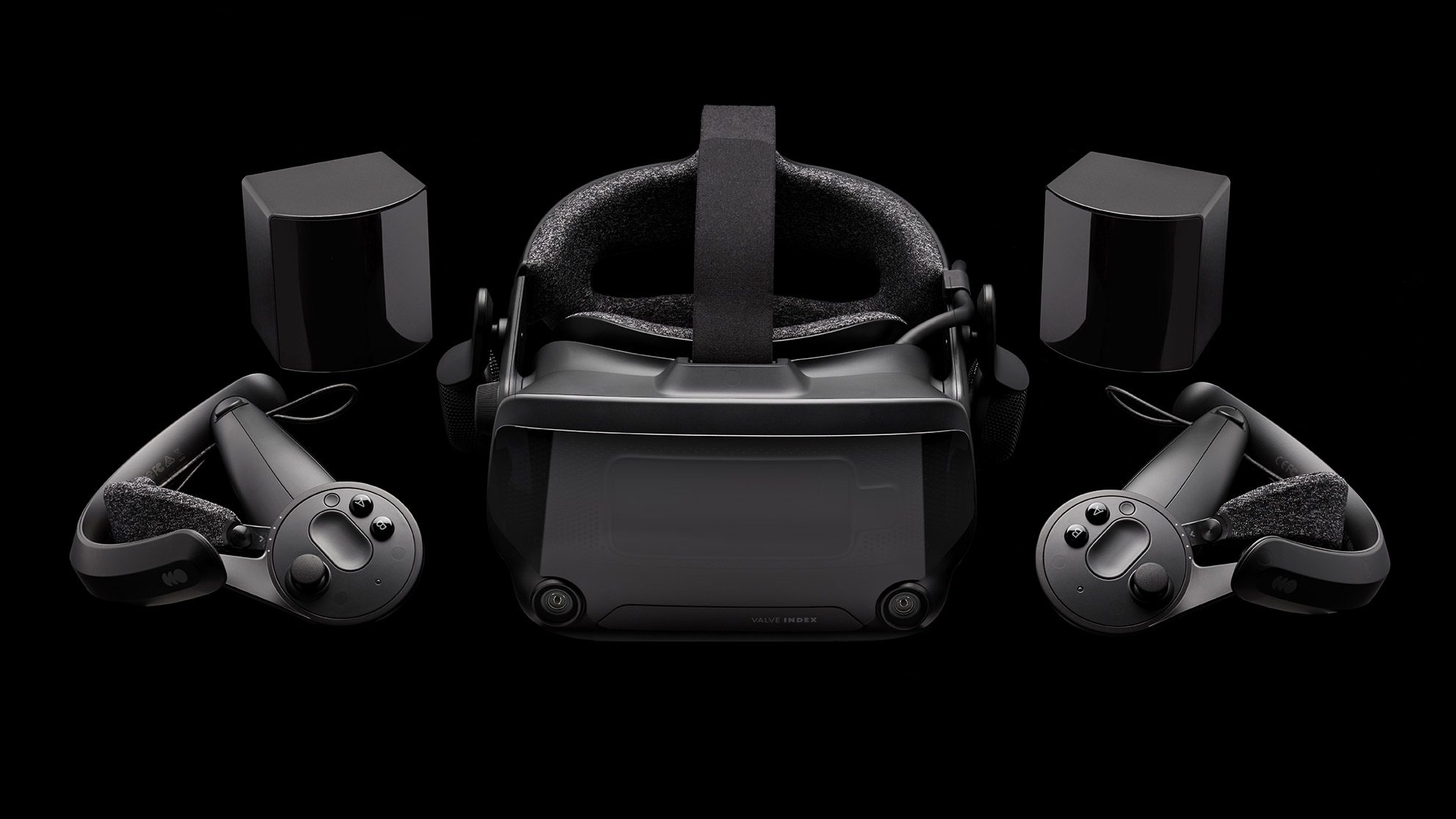
Valve

Image courtesy Valve
Valve Index Recommended VR Specifications:
  • Video Card: NVIDIA GTX 1070 / AMD equivalent or greater
  • CPU: Quad Core+
  • Memory: 8GB RAM
  • Video Output: DisplayPort 1.2
  • USB Ports: 1x USB 2.0 port (USB 3.0 required for camera passthrough), 1x DisplayPort v1.2
  • OS: Windows 10, SteamOS, Linux

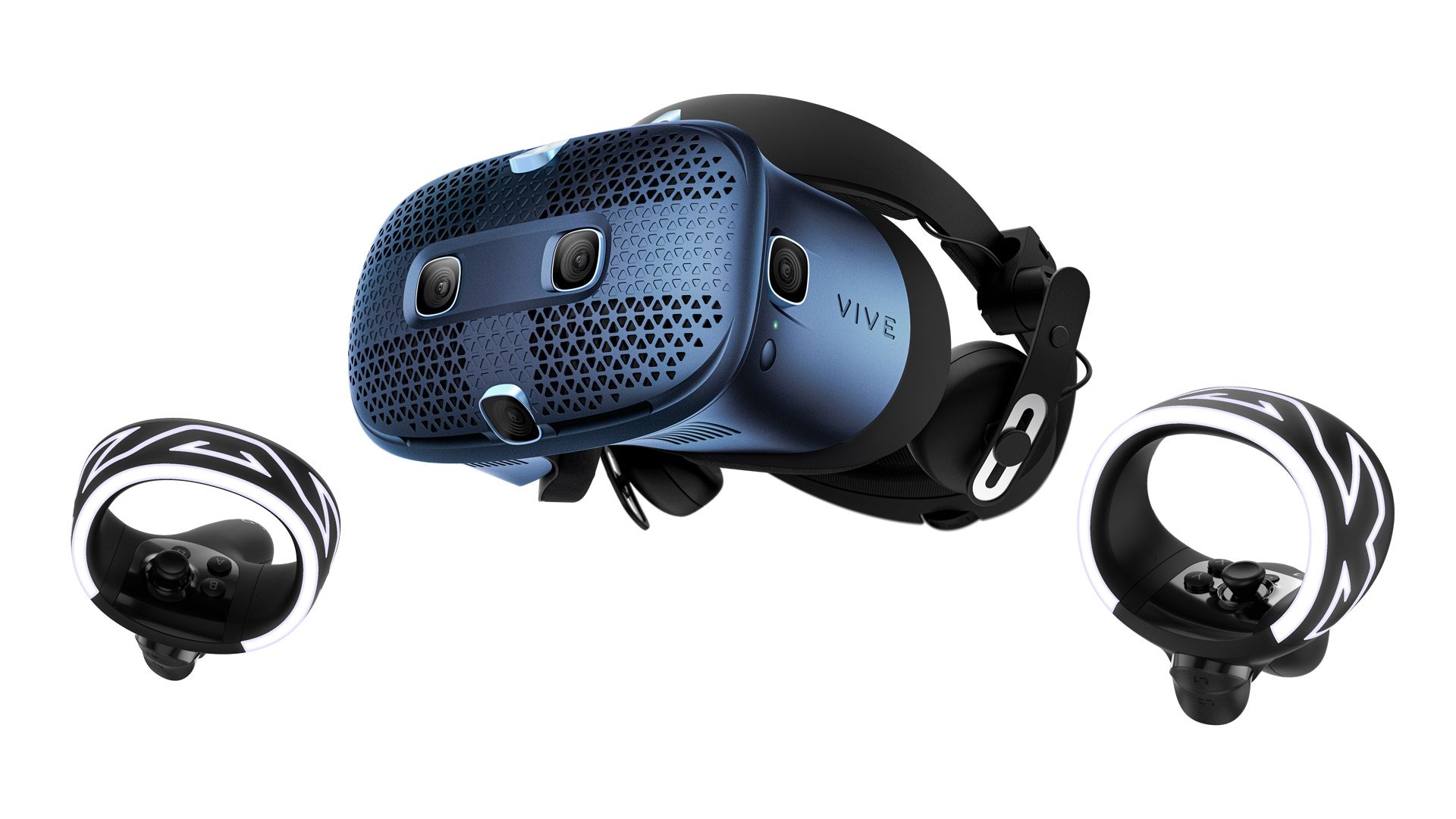
HTC

Image courtesy HTC
Vive Cosmos Recommended VR Specifications
  • Video Card: NVIDIA GTX 1070 / AMD Radeon Vega 56 or greater
  • CPU: Intel Core i5-4590/AMD FX 8350 equivalent or greater
  • Memory: 8GB RAM
  • Video Output: DisplayPort 1.2
  • USB Ports: 1x USB 3.0 port
  • OS: Windows 10
Vive Cosmos Elite Recommended VR Specifications
  • Video Card: NVIDIA GTX 1070 / AMD Radeon Vega 56 or greater
  • CPU: Intel Core i5-4590/AMD FX 8350 equivalent or greater
  • Memory: 8GB RAM
  • Video Output: DisplayPort 1.2
  • USB Ports: 1x USB 3.0 port
  • OS: Windows 10
Vive Pro Recommended VR Specifications
  • Video Card: NVIDIA GTX 1070 / Quadro P5000 / AMD Radeon Vega 56 or greater
  • CPU: Intel Core i5-4590 / AMD FX 8350 or greater
  • Memory: 4GB RAM
  • Video Output: DisplayPort 1.2
  • USB Ports: 1x USB 3.0 port
  • OS: Windows 10
Vive Recommended VR Specifications
  • Video Card: NVIDIA GTX 1060 / AMD Radeon RX 480 or greater
  • CPU: Intel Core i5-4590 / AMD FX 8350 or greater
  • Memory: 4GB RAM
  • Video Output: HDMI 1.4 / DisplayPort 1.2
  • USB Ports: 1x USB 2.0 port
  • OS: Windows 7 SP1, Windows 8.1, Windows 10

WMR & HP

Image courtesy HP
General Windows Mixed Reality Recommended VR Specifications
  • Video Card: NVIDIA GTX 1060 / AMD RX 470/570 or greater
  • CPU: Intel Core i5-4590 / AMD Ryzen 5 1400 or greater
  • Memory: 8GB
  • Video Output: HDMI 2.0 or DisplayPort 1.2 (may vary based on specific headset)
  • USB Port: 1x USB 3.0
  • OS: Windows 10 (Note: Not supported on N versions or Windows 10 Pro in S Mode)
  • Bluetooth Some headsets require Bluetooth 4.0 for controller connectivity

Check your PC: Microsoft offers the Windows Mixed Reality PC Check app which actually benchmarks your machine to which category your machine fits into.

HP Reverb G1 and G2 Windows Mixed Reality Recommended VR Specifications
  • Video Card: NVIDIA GTX 1080 / AMD RX 5700 or greater
  • CPU: Intel Core i5, i7 / AMD Ryzen 5 or greater
  • Memory: 8GB
  • Video Output: DisplayPort 1.3
  • USB Port: 1x USB 3.0
  • OS: Windows 10 (may require latest updates)

Pimax

Image courtesy Pimax
Pimax 8K X Recommended VR Specifications
  • Video Card
    • Upscale Mode: NVIDIA RTX 2060
    • Native Mode: NVIDIA RTX 2080
  • CPU: Intel Core i5-9400 equivalent or greater
  • Memory: 8GB
  • Video Output: DisplayPort 1.2
  • USB Port: USB 2.0 or greater
  • OS: Windows 10
Pimax 8K Plus Recommended VR Specifications
  • Video Card: NVIDIA RTX 2060
  • CPU: Intel Core i5-9400 equivalent or greater
  • Memory: 8GB
  • Video Output: DisplayPort 1.2
  • USB Port: USB 2.0 or greater
  • OS: Windows 10
Pimax 5K Super Recommended VR Specifications
  • Video Card: NVIDIA GTX 1080 Ti
  • CPU: Intel Core i5-9400 equivalent or greater
  • Memory: 8GB
  • Video Output: DisplayPort 1.2
  • USB Port: USB 2.0 or greater
  • OS: Windows 10
Pimax 5K Plus Recommended VR Specifications
  • Video Card: NVIDIA GTX 1070
  • CPU: Intel Core i5-9400 equivalent or greater
  • Memory: 8GB
  • Video Output: DisplayPort 1.4
  • USB Port: USB 2.0 or greater
  • OS: Windows 10, Windows 8.1
Pimax Artisan Recommended VR Specifications
  • Video Card: NVIDIA GTX 1050 Ti
  • CPU: Intel Core i5-9400 equivalent or greater
  • Memory: 8GB
  • Video Output: DisplayPort 1.4
  • USB Port: USB 2.0 or greater
  • OS: Windows 10, Windows 8.1

The post How to Tell if Your PC is VR Ready appeared first on Road to VR.


Ream more: https://www.roadtovr.com/how-to-tell-pc-virtual-reality-vr-oculus-rift-htc-vive-steam-vr-compatibility-tool/

‘Tilt Brush’ Co-creator Leaves Google for ‘very special’ VR Project with ‘Space Pirate Trainer’ Studio

Tilt Brush co-creator Patrick Hackett announced today that he’s leaving Google after nearly six years with the company. His next project will be a VR collaboration with I-Illusions, the studio behind the VR classic Space Pirate Trainer.

Tilt Brush co-creators Patrick Hackett & Drew Skillman joined Google in early 2015 after the company acquired the duo and their application. Both have remained with the studio since. Google formally launched the VR art application in 2016 to much acclaim among creatives and doodlers alike. The app eventually made it to Oculus PC, Oculus Quest, WMR, and PSVR, and even had a recurring cameo on The Tonight Show.

Hackett announced today that he’s departing Google after nearly six years with the company. Hinting at what’s next, he said “next week I’m starting work with [Dirk Van Welden] and the [I-Illusions] crew on a very, very special VR thing.”

Dirk Van Welden is the head of I-Illusions, the studio behind the VR classic Space Pirate Trainer (2017). Though Hackett will be collaborating with the studio, he maintains “I’ll be independent again, so would love to hear if you’ve got a rad project you want to collaborate on,” indicating that he isn’t directly joining the team.

With Google receding from its VR ambitions in 2018, the company recently announced it would shutter Poly, it’s 3D model hosting site which also served as a repository for storing and sharing content made with Tilt Brush. While Tilt Brush itself will otherwise continue to function in perpetuity, it isn’t clear if the app is being actively developed beyond maintenance needs, though Hackett says “I’ve left Tilt Brush in good hands with a solid plan for the future. Stay tuned.”

Drew Skillman, the other Tilt Brush co-founder, continues to work at Google but has long since moved onto other projects, according to his LinkedIn profile.

The post ‘Tilt Brush’ Co-creator Leaves Google for ‘very special’ VR Project with ‘Space Pirate Trainer’ Studio appeared first on Road to VR.


Ream more: https://www.roadtovr.com/tilt-brush-patrick-hackett-i-illusions-vr-collaboration/

‘Pavlov VR’ Brings WW2 Tank Warfare & Weapons in Biggest Update Yet

Pavlov VR, the VR shooter in Early Access for PC VR headsets, just got its biggest update yet which not only brings WW2 weapons, character models, and maps to the game, but also multiplayer tanks so you can finally put a little more Blitz in your Krieg.

The free update is now live, and includes weapons from both the Axis and Allied powers, including Germany, Britain, the US, and the USSR. In total, the update brings 18 new guns, six grenade variations and three rocket launchers to the game.

One of the biggest parts of the update is undoubtedly the new multi-crew tanks. Each tank includes three spots, which service a driver, gunner, and commander.

Everyone is important though, since manning a tank requires all three players to participate. You’ll need to drive, load munitions, spot for enemies, and aim/shoot heavy machine guns and its main armament too. Needless to say, the most disciplined tank crews will probably be the most successful.

Alongside tanks, a new mode is also here called ‘Tank TDM’, which features a 10v10 game mode for maps big enough for tanks to navigate.

Developers Vankrupt Games say in the new tank mode a “special class that will spawn with a blowtorch in their utility for Tank repairing. To repair a tank, activate the gas by pressing trigger on the black knob and making contact with the flame to the tank to weld repairs.”

You’ll be able to find a game any time of the day thanks to the studio’s 24/7 servers, which host ‘Tank TDM’ on its first-party Stalingrad map. There are also plenty of third-party maps now created by community members too.

The update comes free as a part of the base game, which is available for PC VR headsets on Steam for $15 (currently 40% off $25 MSRP). You can check out the full list of updates coming to Pavlov VR here.

The post ‘Pavlov VR’ Brings WW2 Tank Warfare & Weapons in Biggest Update Yet appeared first on Road to VR.


Ream more: https://www.roadtovr.com/pavlov-vr-tanks-ww2-update/

Facebook Researchers Explore Mechanical Display Shifting to Reduce Screen Door Effect

Researchers from Facebook Reality Labs and the University of Arizona published new work exploring the use of high-speed mechanical display shifting to reduce the so-called screen-door-effect (SDE) of immersive displays. SDE is caused by unlit spaces between pixels leading to the immersion-reducing appearance of a ‘screen door’ between the viewer and the virtual world. The researchers experiment with rapidly and minutely shifting the entire display to cause the display’s pixels to fill in the gaps.

SDE has been one the leading visual artifacts in modern VR headsets since the introduction of the Rift DK1 development kit in 2013. While SDE can be defeated with brute-force by employing extremely high density displays—in which the unlit spaces between pixels are too small to be seen by the naked eye—most consumer VR headsets today still exhibit SDE (with the near exception of Reverb G2), hurting immersion and visual clarity.

A real example of the screen door effect | Image courtesy Facebook Reality Labs Research

Beyond ultra high pixel density, other methods have been employed to reduce SDE. For instance, some headsets choose a smaller field of view which reduces the apparent visibility of SDE. Other headsets use a diffuser film on the display to help blend the light from the pixels into the unlit spaces between them.

Another proposal is to rapidly and minutely shift the display such that nearby pixels fill in the unlit gaps. While this might seem like it would create the appearance of a dizzying jiggling display, it’s been demonstrated with other display technologies that moving a point of light (ie: a pixel) quickly enough can create the appearance of a stable image.

Researchers Jilian Nguyen, Clinton Smith, Ziv Magoz, and Jasmine Sears from the University of Arizona and Facebook Reality Labs Research explored and experimented with the idea in a paper titled Screen door effect reduction using mechanical shifting for virtual reality displays.

Rather than building a VR headset with mechanical display shifting right out of the gate, the paper’s goal was to demonstrate and quantify the efficacy of the method.

Display Actuation and Modes


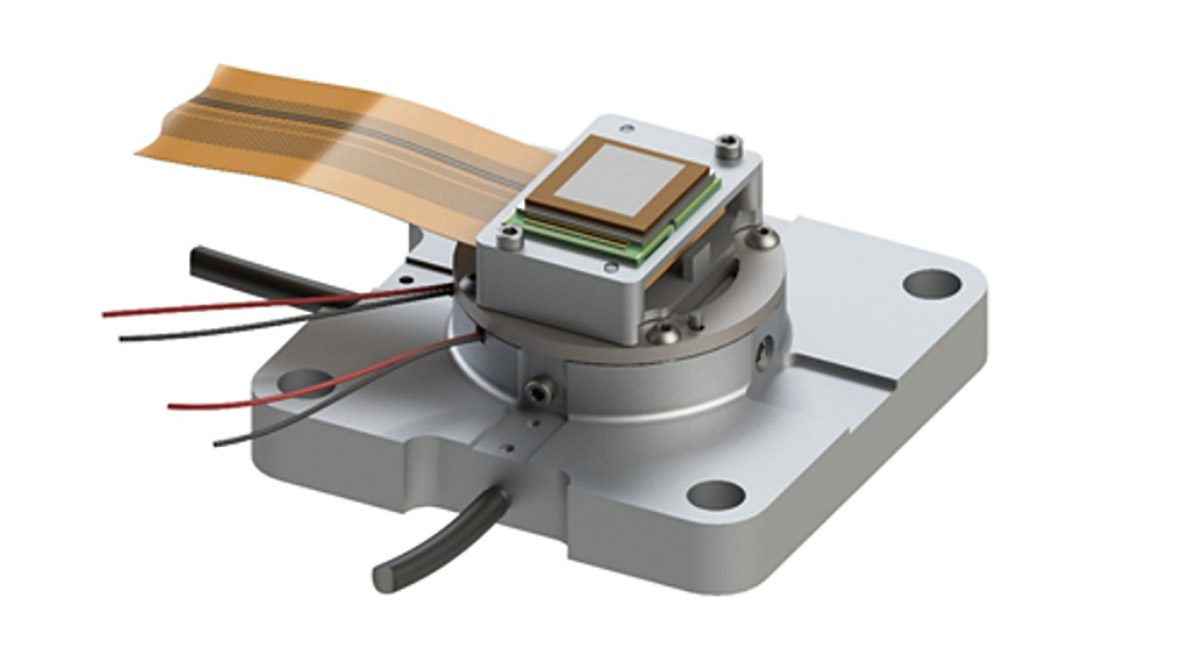
The display actuation mechanism | Image courtesy Facebook Reality Labs Research

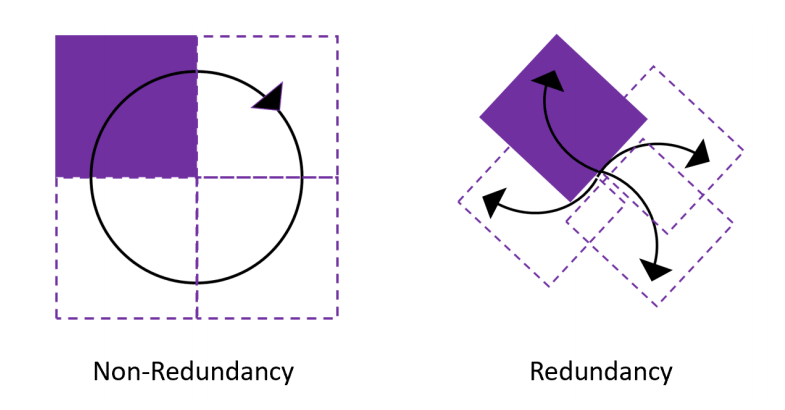
The researchers designed a static platform with two piezoelectric actuators which, together, shift the display in a circular motion at 120Hz—in effect, causing each pixel to trace a 10µm circle 120 times per second. The size of the circle was picked based on the distance between the display’s pixels in order to optimally fill in the unlit spaces between pixels. The researchers call this circular path ‘Non-redundancy’ mode.

They also smartly utilized a 480Hz display which allowed them to experiment with a more complex pixel shifting path which they called ‘Redundancy’ mode. This approach aimed to not only fill in the gaps between the pixels with some additional overlap, but split the displayed frame into four sub-frames which are each uniquely shifted and displayed to account for the pixel movement. This means that when a pixel shifts to a location where it would fill in the SDE gap, it uses the correct color which would be used if a pixel was located in that position in the first place.

The two pixel movement modes addressed in the paper | Image courtesy Facebook Reality Labs Research

While the paper is limited to exploring these two pixel paths, the researchers say that others could be employed based on display characteristics.

“Pixel shifting is not limited to a circular shape. Indeed, an elliptical path or even a figure-eight path could be used by controlling the amplitude of each axis’ movement. Paths can be traced in many ways to explore screen door reduction,” the researchers wrote. “For the micro OLED display, a circular path was well-suited to the square pixel and sub-pixel layouts. This path is used to balance the length of the path with the fill factor, minimizing the speed the actuators must operate at.”

The display actuation platform for experimentation | Image courtesy Facebook Reality Labs Research

With the platform built and capable of shifting the display rapidly in the desired paths, the next step was to objectively quantify the amount of SDE reduction, which proved to be difficult.

Quantitative Measurement of Mechanical SDE Reduction

The authors first sought to objectively measure where each subpixel began and ended, but found that the resolution of the camera they employed for the task was not fine enough to clearly delineate the start and end of each subpixel, let alone the spaces between them.

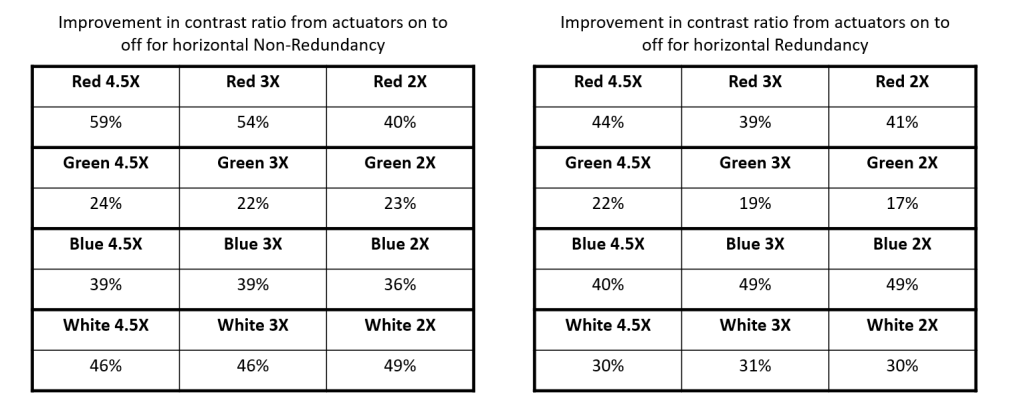
Another approach to quantify SDE reduction was to measure the contrast ratio of a section of the display and compare it to when the screen actuation was on vs. off. Lower contrast would imply less SDE due to moving pixels filling in the unlit spaces and creating a more solid image. While the authors maintained that this measurement isn’t necessarily a reflection of the SDE reduction as the naked eye would see it, they believe it’s a meaningful quantitative measurement.

Contrast ratio reduction in both modes at various magnification levels | Image courtesy Facebook Reality Labs Research

Qualitative Assessments of Mechanical SDE Reduction

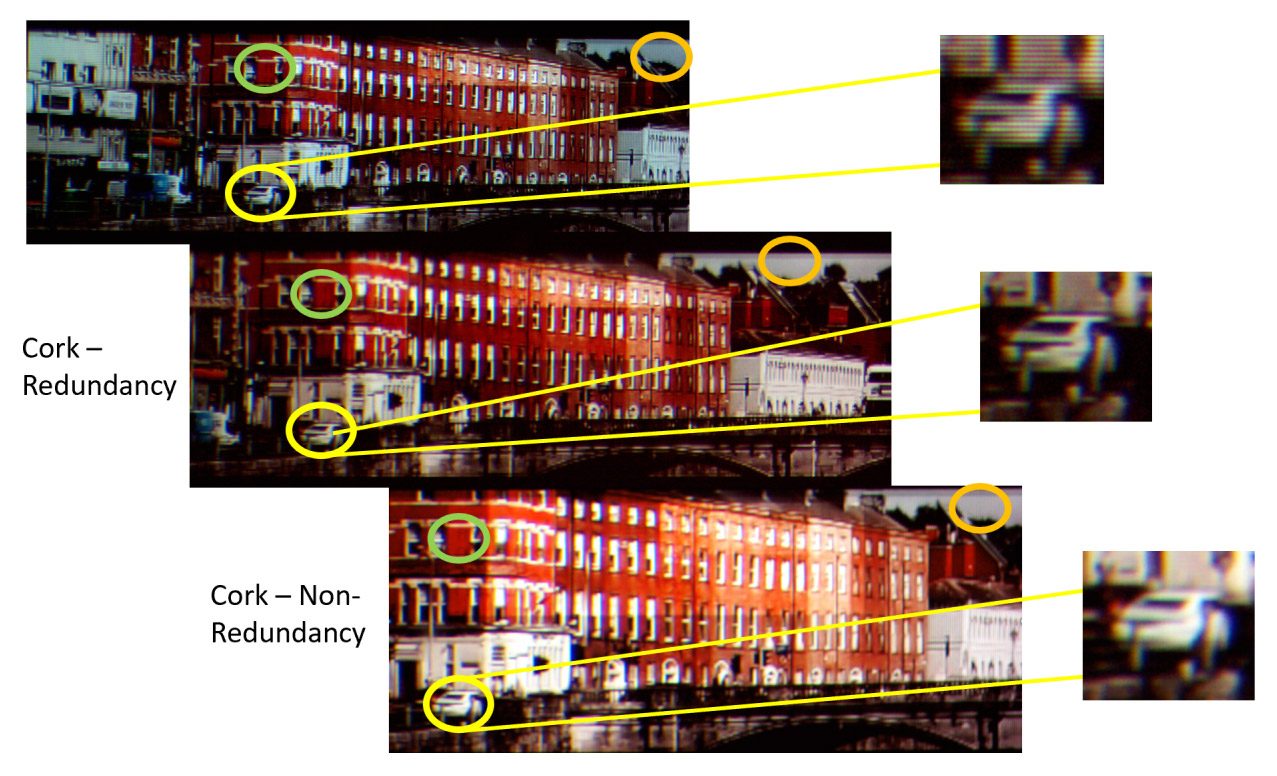
Beyond their efforts to quantitatively measure the SDE reduction, the researchers also wanted to look qualitatively at the change. The clearest demonstration of the benefits came from looking at a natural photo with complex scenery.

Image courtesy Facebook Reality Labs Research

Here, the ‘Non-redundancy’ mode clearly reduced the SDE while apparently retaining equal sharpness. Impressively, the ‘Redundancy’ mode not only reduced SDE, but even appears to noticeably sharpen the image (note the zoomed-in sections showing details in the rear of the car).

The image sharpening of the ‘Non-redundancy’ mode is an interesting additional benefit because it actually increases the resolving power of the display without increasing the number of pixels.

Based on their experimentation the researchers also suggest a user-study approach for future investigations which could be used to quantify any SDE reduction method, whether that be mechanical shifting, diffusers, or different sub-pixel layouts and optics.

The researchers conclude:

In using mechanical shifting of pixels for screen door reduction, the dead space of the display needs to be characterized to define the path shape and shift distance required of the mechanical shifting system. With appropriate application of mechanical motion, SDE can be qualitatively reduced. A promising method of screen door visibility quantification uses natural scenes and human subjects to determine the magnification at which SDE and screen door reduction artifacts become noticeable.

– – — – –

While the brute force approach of defeating SDE with ultra high pixel density displays will likely come to fruition, a mechanical approach to SDE reduction could allow headset makers to ‘get more for less’ by boosting the effective resolution of their display while reducing SDE. This could also have knock-on bonuses to display design, as display makers would be less constrained by the need to achieve exceptionally high fill factors.

The post Facebook Researchers Explore Mechanical Display Shifting to Reduce Screen Door Effect appeared first on Road to VR.


Ream more: https://www.roadtovr.com/mechanical-display-shifting-sde-reduction-facebook-reality-labs-research/

Thursday, January 7, 2021

More ‘Hitman 3’ VR Gameplay Revealed in New Trailer

Hitman 3 is slated to release on consoles and PC on January 20th, however the only version getting VR support for now is on the PS4/PS5 platforms. To get the hype train moving, developers IO Interactive just gave us another peek at the upcoming first-person PSVR mode in a new video.

Note: The new video is age-restricted, so it can only be viewed on YouTube. Check it out here.

We haven’t gone hands-on yet, and we’re looking to have our review out at launch. You can be sure we’ll put the game through its paces.

There is at least one issue that will be interesting to confront in our full review, and it could hamper immersion. Although the game is slated to include a massive amount of interactable items and weapons, and first-person gun-wielding and hand-to-hand combat, unfortunately the game only supports gamepads. Aiming and interacting with objects is done with a DualShock 4 controller—not DualSense and not PS Move.

Whatever the case, Hitman 3 lets you play the full trilogy in VR as well as sandbox missions for standalone fun. We’ll be primarily interested to see whether gameplay translates well enough to feel like a proper VR game that you would chose to play all the way through, and not simply a glorified VR mode.

The post More ‘Hitman 3’ VR Gameplay Revealed in New Trailer appeared first on Road to VR.


Ream more: https://www.roadtovr.com/hitman-3-vr-gameplay-trailer/

Oculus Quest 2 Surpasses Original Quest in Monthly Active Users

In a look back at 2020, Facebook Reality Lab’s head Andrew Bosworth revealed that Quest 2 quietly celebrated a few new milestones shortly after its October 13th launch.

In the blogpost, Bosworth says that despite the need for social distancing in 2020, it’s actually been a pretty great year for the company in terms of growing virtual reality.

“VR had a tremendous year. Oculus Quest 2 is our fastest-growing VR headset, thanks to the convergence of leading VR form factors and the content built by our developer community.”

Bosworth didn’t mention any hard figures, but he says that Quest 2 “surpassed the original Quest’s monthly active people in less than 7 weeks,” an impressive feat.

A Facebook spokesperson told Road to VR that this is based on concurrent measurements between the two headsets. However Quest 2 has also since surpassed Quest 1’s record high number of monthly active users, the company tells us.

Photo by Road to VR

Considering the original Quest managed to generate $150 million of revenue in apps and games sales—calculated after its 2019 launch until shortly before Quest 2 was released—there’s no telling what Quest 2 will be able to accomplish in the same time frame.

Additionally, Bosworth says there are now more women using Quest 2 than any of their previous headsets—which Facebook says is based on overall percentage, not simply a raw number.

None of this really comes as a surprise though; company CEO Mark Zuckerberg reported shortly after its launch that Quest 2 had generated five times the number of pre-orders over the original, so Quest 2 was well positioned to be a hit. Granted, it’s been a captured market, with stay-at-home orders affecting many people, however Bosworth says the company is also focusing on providing work-from-home solutions to help fill in the obvious gaps.

“This is the year we take steps to make immersive experiences more social with Facebook Horizon,” he says, referring to the company’s still in-beta social VR platform. “And as the office concept evolves, we’re building out our capacity for meaningful social presence in virtual work spaces”

What does 2021 hold for Facebook? Outside of eventually releasing Horizon for regular users, it’s hard to tell. We know the company is gearing up to one day deliver AR glasses thanks to its research done via Project Aria, a sensor-rich pair of glasses which the company will use to train its AR perception systems and asses public perception of the technology That’s not likely happening any time soon though, so we’re interested to see just where the company goes in the meantime.

The post Oculus Quest 2 Surpasses Original Quest in Monthly Active Users appeared first on Road to VR.


Ream more: https://www.roadtovr.com/oculus-quest-2-monthly-active-users/

At $600K, Tundra Tracker Smashes Kickstarter Goal in Less Than 24 Hours

Tundra Tracker, the SteamVR Tracking tracker in development by Tundra Labs, has well exceeded its $250,000 Kickstarter goal in less than 2...